
Compliance Training for Contractors: Staying Ahead of Regulations
Master compliance training for contractors with essential regulations and best practices to protect your business and team.

Project budgets spiral out of control when you lack visibility into spending. At adding technology, we’ve seen countless projects derail because teams didn’t track expenses against their plan until it was too late.
A project budget tracker template gives you real-time insight into where your money goes and how it compares to what you planned. This guide walks you through setting one up and using it to keep costs in line.
A project budget tracker template maps planned spending against actual spending as your project unfolds. It’s not a static spreadsheet you fill out once and ignore. Teams that treat their budget tracker as a living system catch cost problems weeks before they become crises. The tracker captures labor costs, materials, equipment, and overhead tied directly to tasks, then compares what you budgeted to what you’re actually spending. This comparison is where the real value emerges. Without it, you’re flying blind. According to Wellingtone’s 2024 data, only 34% of projects are delivered on budget, which means two out of three projects overspend. The primary reason isn’t bad planning; it’s a lack of visibility into actual versus planned costs until it’s too late to correct course.
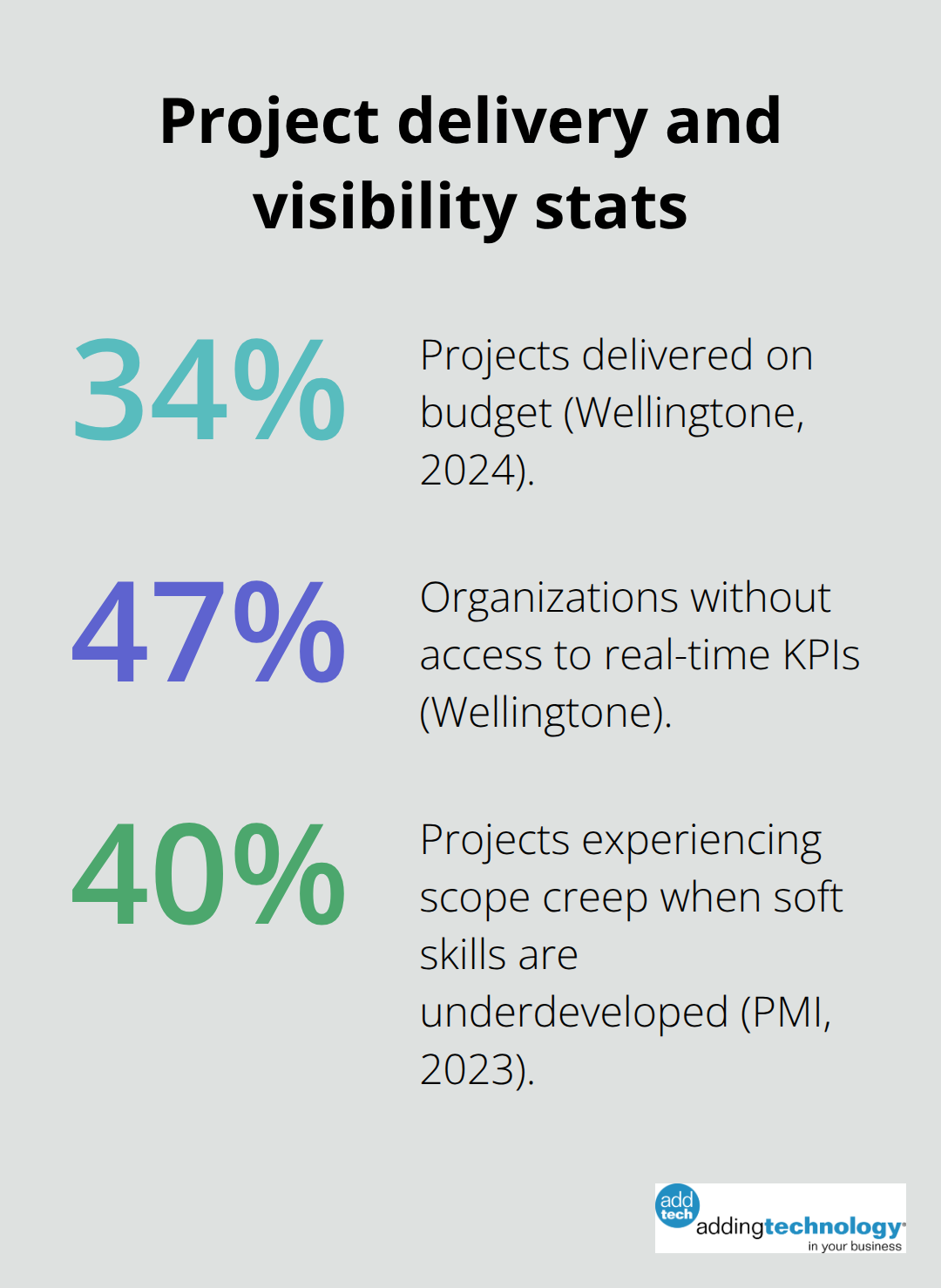
The most effective budget trackers operate at the task level, not just at the project level. If you only monitor total project spend, a $10,000 overrun on labor could hide a $15,000 overrun on materials masked by savings elsewhere. Wellingtone’s research shows that 47% of organizations lack access to real-time KPIs, which means they can’t spot variances when they occur. Your tracker should capture labor hours and costs by team member or role, material invoices linked to specific deliverables, and equipment or software expenses assigned to the tasks that require them. When you record actual costs weekly instead of monthly, you catch a 5% drift immediately rather than discovering a 20% overrun at month-end. Real-time tracking also reveals which cost categories drive variance. In construction and IT projects, labor typically represents 60–70% of total project cost, so scrutinizing labor variances pays off faster than obsessing over minor supply expenses.
A variance occurs when actual spending differs from planned spending, and your tracker must flag these clearly. If a task shows 80 hours spent but only 60 hours budgeted, you need to know whether the work is actually complete or whether scope has expanded. That distinction determines whether you absorb the cost or recover it through change orders. Assign clear ownership for budget monitoring; Wellingtone found that 82% of organizations have at least one PMO, and those PMOs succeed when one person owns the budget tracker and reviews it weekly. When variances exceed 10% on any line item, that’s your signal to investigate and act. Some projects reallocate staff or renegotiate supplier terms to regain budget. Others adjust scope or timeline to prevent further overruns. The tracker gives you the data to make that call instead of guessing.
Scope creep and budget overruns travel together. PMI’s 2023 research found that 40% of projects experience scope creep when soft skills are underdeveloped, and those projects almost always exceed their budgets. Your tracker must distinguish between work that was in the original scope and work that wasn’t. When a client requests a new feature or a stakeholder adds a deliverable, that change should trigger a new task with its own timeline and cost estimate. This separation prevents you from absorbing unexpected costs and keeps your baseline budget intact for comparison purposes. A well-structured tracker makes this separation visible, so you can either approve the change formally or push back with data showing the cost impact.
Excel spreadsheets work for small projects, but they lack automation and real-time updates that catch budget drift before it becomes a crisis. Software that links your budget directly to your task list and timesheet system delivers far better results. When labor hours feed automatically into cost calculations, you eliminate manual entry errors and time delays. If you run a construction project with subcontractors, materials, and equipment rentals, spreadsheets force you to update costs manually each week, which means you always work with stale data.
Project management software like Microsoft Project or dedicated real-time budget software synchronize actual spending with planned budgets instantly, showing variances the moment they occur. The initial setup takes longer than opening Excel, but the payoff is substantial: teams using real-time budget software catch overruns within days instead of discovering them at month-end when corrective action is harder and more expensive.
Start by organizing your budget around your Work Breakdown Structure, not arbitrary categories. Each task or deliverable gets its own cost line, broken into labor, materials, and equipment where applicable. If you build a new office renovation, don’t lump all labor into one line; separate carpenter labor, electrician labor, and project management labor so you can see which trades drive costs. This task-level structure reveals exactly where money goes and which work packages consume the most resources. Input your initial budget figures as time-phased allocations across weeks or months, not as lump sums, because projects don’t spend evenly. A task might consume 20% of its budget in week one, 60% in week two, and 20% in week three. When you map spending to a timeline, you spot when actual costs deviate from that curve immediately.
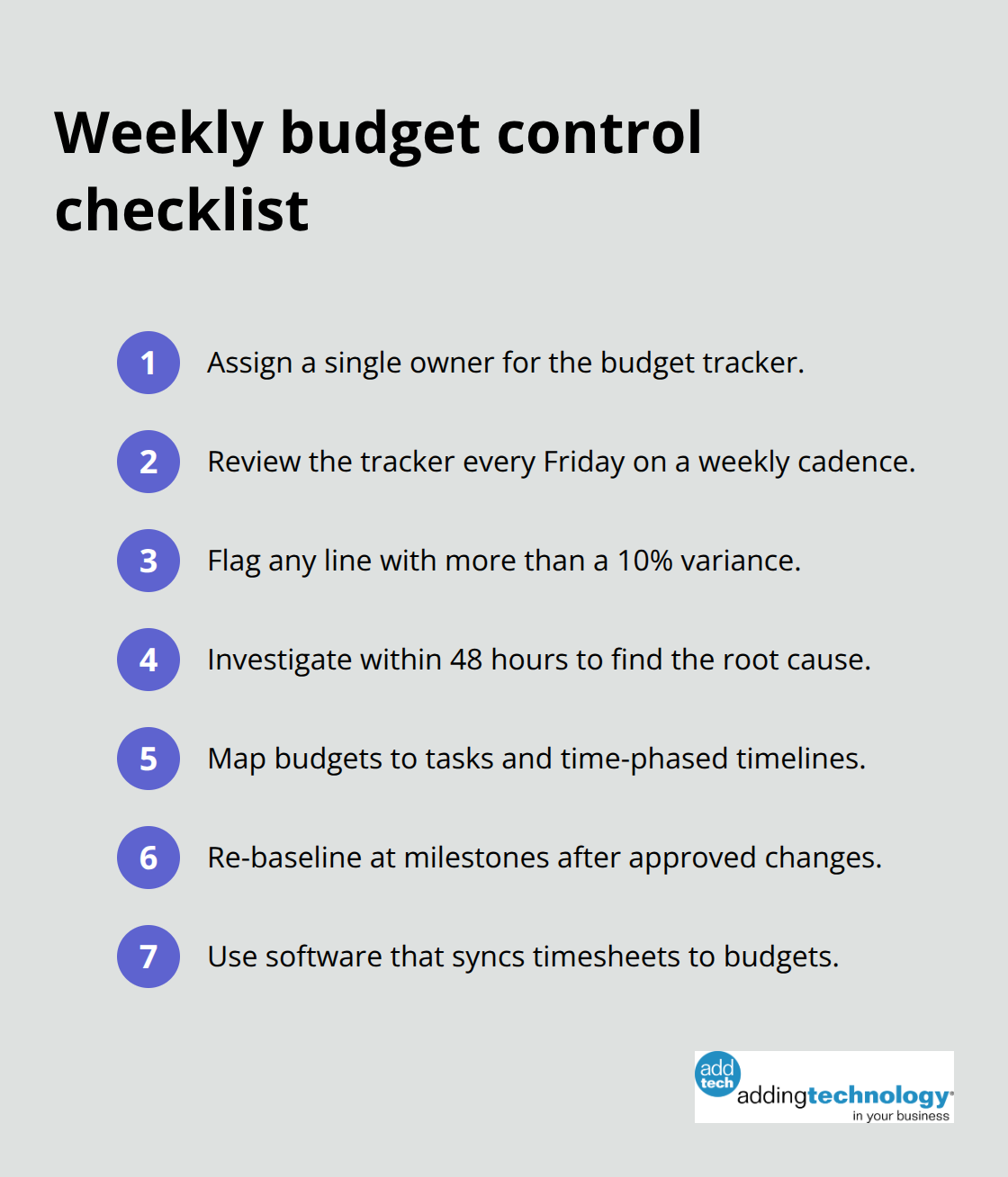
Establish a weekly budget reviews cadence, not monthly. Assign one person, typically the project manager, to own the tracker and review it every Friday. That person flags any variance exceeding 10% and investigates whether it’s a timing issue, a scope change, or a genuine cost problem. This single point of accountability prevents budget tracking from becoming a shared responsibility where no one takes action. Real-time software enables this weekly rhythm because data updates automatically rather than requiring manual compilation.
Set checkpoints at major milestones or phase gates where you formally re-baseline the budget if approved changes have shifted costs. This structure keeps your tracker accurate and actionable rather than a report that no one acts on. When scope changes receive formal approval, the baseline adjusts to reflect the new reality, and your variance calculations remain meaningful. Without re-baselining, you lose the ability to distinguish between original scope overruns and costs tied to approved additions. With this foundation in place, you’re ready to populate your tracker with actual spending data and begin monitoring performance against plan.
Real-time expense recording separates trackers that drive decisions from those that collect dust. The moment a team member logs hours, a supplier sends an invoice, or equipment gets rented, that cost must enter your system within days, not weeks. Software that integrates timesheets directly into budget calculations eliminates the lag that makes most spreadsheet-based trackers useless. When labor costs update automatically from your timesheet system, you see immediately whether a task consumes budget at the rate you predicted. If a developer was budgeted at 40 hours and has already logged 50 hours by mid-week while the task is only 60% complete, that variance demands attention before the overrun balloons to 60 or 80 hours.
Material and equipment costs require the same treatment. Link supplier invoices to specific tasks so you know whether the concrete pour cost what you estimated or whether prices shifted. This connection between actual spending and task-level budgets transforms your tracker from a historical record into an operational tool.
Comparing actuals against planned budget means establishing clear thresholds for action, not just watching numbers move. Set a hard rule that any variance exceeding 10% on a single line item triggers investigation within 48 hours. If a task shows a 15% labor variance, you need to determine whether the work is genuinely harder than estimated, whether scope expanded without formal approval, or whether hours were misallocated to the wrong task.
Teams reviewing budgets weekly catch problems when they’re still small, whereas monthly reviews discover damage already done. Assign this investigation to the person who owns the tracker, not to the project manager alone, because the tracker owner understands the data structure and can spot data entry errors versus real cost problems.
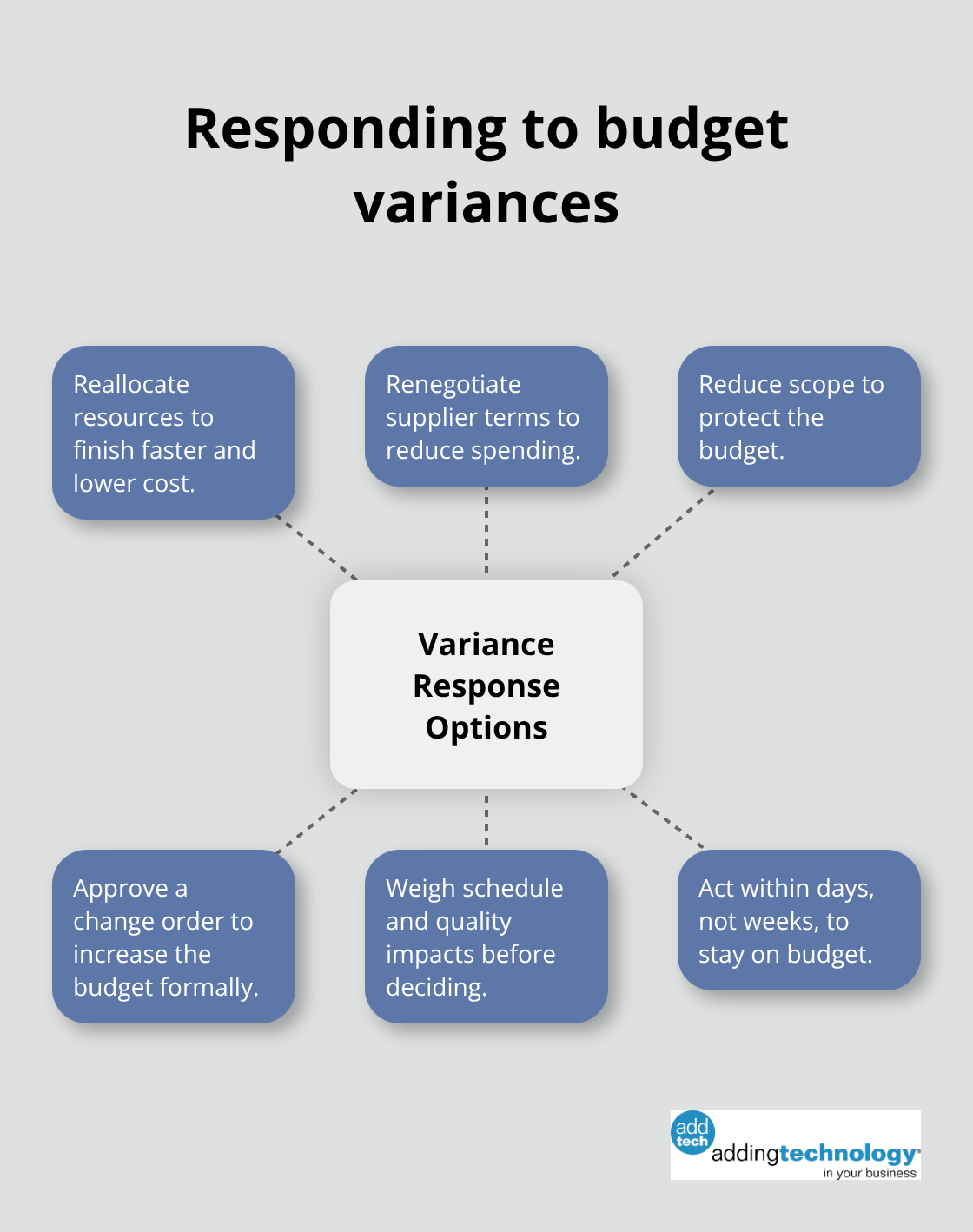
When a variance requires action, the options are straightforward: reallocate resources to finish faster and cheaper, renegotiate supplier terms, reduce scope to stay on budget, or formally approve a change order that increases the budget. Each choice carries different implications for schedule and quality, but the tracker gives you the facts to make that choice rather than operating on assumptions. Projects delivered on budget are those where variances trigger decisions within days, not weeks.
Effective budget management rests on three core practices: establish a baseline budget tied to your work breakdown structure, review actual spending weekly against that baseline, and act on variances within 48 hours. Most projects that stay on budget succeed because someone owns the project budget tracker template, checks it consistently, and escalates problems before they compound. When people know their hours and expenses feed into a visible tracker that gets reviewed every Friday, they become more careful about scope creep and cost discipline.
Teams that track weekly catch a 5% overrun and correct it immediately, whereas teams that review monthly discover a 25% overrun when options for recovery have narrowed. Wellingtone’s data shows that only 34% of projects land on budget, but that percentage climbs significantly when organizations implement real-time tracking and assign clear ownership. Your next step is to choose your tool: if your project is small and straightforward, a structured Excel template with task-level cost lines works; for larger projects with multiple cost categories and team members, software that links timesheets to budgets and updates variances automatically delivers far better results.
At adding technology, we help construction teams build financial systems that catch cost problems before they become crises. If you manage projects where labor, materials, and equipment costs shift constantly, real-time job costing software ensures you see variances the moment they occur and make decisions with current data rather than stale reports. Start your tracker this week, assign ownership, and commit to weekly reviews.













At adding technology, we know you want to focus on what you do best as a contractor. In order to do that, you need a proactive back office crew who has financial expertise in your industry.
The problem is that managing and understanding key financial compliance details for your business is a distraction when you want to spend your time focused on building your business (and our collective future).
We understand that there is an art to what contractors do, and financial worries can disrupt the creative process and quality of work. We know that many contractors struggle with messy books, lack of realtime financial visibility, and the stress of compliance issues. These challenges can lead to frustration, overwhelm, and fear that distracts from their core business.
That's where we come in. We're not just accountants; we're part of your crew. We renovate your books, implement cutting-edge technology, and provide you with the real-time job costing and financial insights you need to make informed decisions. Our services are designed to give you peace of mind, allowing you to focus on what you do best - creating and building.
Here’s how we do it:
Schedule a conversation today, and in the meantime, download the Contractor’s Blueprint for Financial Success: A Step by-Step Guide to Maximizing Profits in Construction.” So you can stop worrying about accounting, technology, and compliance details and be free to hammer out success in the field.